Gemini
iPhone CGI ai Image Prompt
Written for Gemini. Results and reference-photo support may differ across models.
The complete prompt
Use ONLY the uploaded subject photo as the PRIMARY IDENTITY REFERENCE.
ANALYSE THE REFERENCE

Before generating, analyse the uploaded image. Detect whether the subject is male or female: whether a Sikh turban is present or not; facial hair, hairstyle, skin tone, facial structure, age appearance and overall style. Preserve those characteristics naturally and consistently.
CONCEPT

Create a high-end, ultra-photorealistic surreal editorial portrait built around an enormous spiral pathway of gigantic metallic-blue smartphones floating high above a city and clouds. Preserve the exact identity of the uploaded person throughout.
IDENTITY RULE

If the uploaded subject is a Sikh man wearing a turban, KEEP HIM IN A TURBAN in every appearance. Never replace it with a cap or a beanie. If the male does not wear a turban, do not add one. If the subject is female, preserve her original hairstyle and feminine facial characteristics. Do not paste a face onto another body; reconstruct the person naturally with correct neck, body, pose, lighting and perspective.
WARDROBE

Automatically choose clothing appropriate to the detected subject. For a male subject use a stylish grey knitted sweatshirt, loose blue denim jeans and premium tan/brown boots. If appropriate, print “Mr. Alex” clearly on the sweatshirt. For a female subject, choose a classy, modern and modest outfit to suit her appearance rather than copying masculine clothing. Fabrics must show realistic texture, folds, seams and fit.
SCENE

Build a dramatic continuous spiral of huge metallic-blue smartphones beginning in the foreground and curling upward into the distant sky. Place the MAIN SUBJECT prominently on one foreground phone in a confident, sitting, walking, leaning or looking-into-the-distance pose, with one leg closer to camera and one hand slightly reaching toward the lens. Add many smaller versions of THE SAME SUBJECT throughout the spiral in varied natural poses — standing, sitting, walking, leaning or looking into the distance. Do not introduce unrelated people.
ENVIRONMENT

Use a vast blue sky, clean white clouds and bright cinematic sunlight. Show a detailed modern city, neon lights, bridges and water far below through openings in the clouds. The scene should feel extremely high, enormous in scale and surreal while still recognizably believable.
CAMERA & COMPOSITION

3:4 portrait orientation. Use an ultra-wide cinematic perspective around 20-24mm full-frame, with a low-angle camera close to the foreground phone. Create strong forced perspective: huge foreground subject, prominent subject in front, progressively smaller phones and duplicate subjects flowing into the spiral. Keep the main face fully visible, recognizable and sharp.
LIGHTING

Bright premium daylight with directional sun, soft blue rim light, realistic contact skin shadows and subtle rim light around the subject and turban or hair. Preserve skin detail, metallic highlights and natural texture with smooth cinematic highlight roll-off.
STYLE

Luxury surreal advertising CGI photography mixed with high-end fashion editorial and polished commercial CGI realism. Photorealistic skin, accurate anatomy, detailed knit and denim textures, realistic colour reflections, atmospheric depth, crisp foreground detail and premium cinematic colour grading. Ultra-detailed, high-resolution 4K/8K appearance.
AVOID

Identity drift, generic faces, inconsistent miniature people in the spiral, missing turban, adding a turban to a non-turban subject, different people in the spiral or distorted anatomy, extra camera lenses, misplaced hands, floating feet, broken phone geometry, blurry shaped phone lenses, unfitted “Mr Alex”, random text, plastic skin, cartoon look, overexposure, excessive HDR, heavy blur, motion blur, sunglasses hiding the eyes, poor anatomy, random text, logos, or watermarks. Use this prompt.
Copy the complete prompt and use your own reference photos where requested.

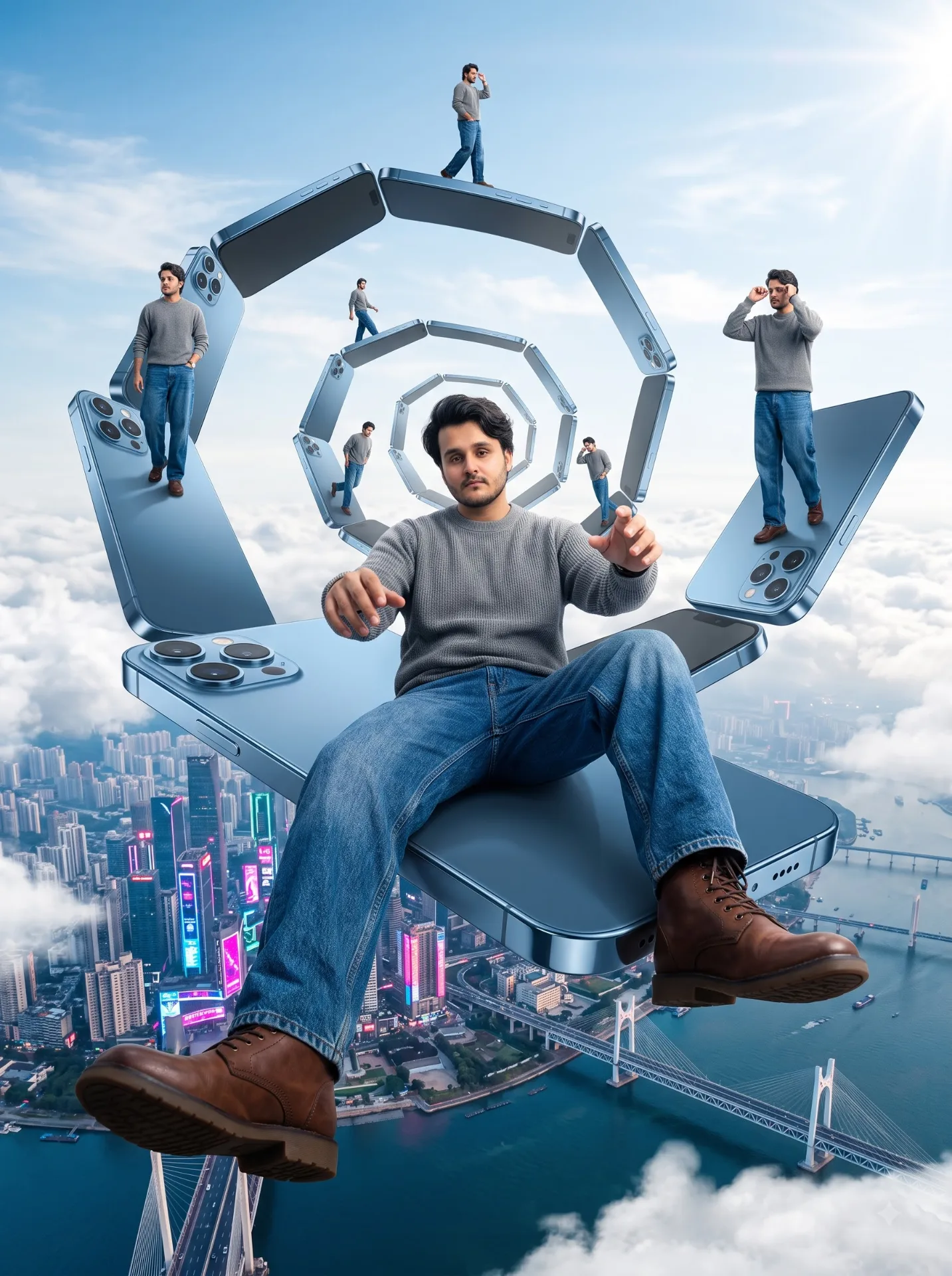
Example image provided with this prompt. This prompt has not been tested by our site.